PHI Shreds Theory of Application Development

The minimum necessary principle serves as a cornerstone of any covered entity’s approach to HIPAA compliance. In a nutshell, the minimum necessary principle states that when disclosing Protected Health Information “PHI”, a covered entity should only disclose the smallest amount of PHI possible, while still: 1) adhering to the patient’s authorization; 2) complying with the law; and 3) responding to the request.  With that in mind, I present the PHI Shred Theory of Application Development.

PHI Shreds: PHI Shreds are a manner of developing health IT applications wherein the developer focuses on keeping as little PHI on the mobile device or computer as possible. While this seems simple and logical, think about the recent mobile device and computer breaches. For instance, the recent Aspire Indiana breach (Erin McCann did a great write up here) where several unencrypted laptops were stolen that contained: Name, DOB, Client info, Employee Info, HIV data, and substance abuse information. At some point, the decision was made that case workers/nurses/doctors using these laptops needed: 1) a mobile device; 2) with heavy unencrypted PHI content; and 3) a client database stored locally.

In a PHI Shred environment, the laptops and applications utilized by Aspire would have done a few things differently. First, the laptops would be encrypted. Seriously, we can debate about this all you want, but an unencrypted laptop is a recipe for disaster. Second, the laptops would have only contained the shreds of information the employee needed at the time they were working, rather than full databases.

To implement the PHI Shred theory, sit down with case workers and ask them, what do you need to do your job? The answers may honestly surprise you. Most of the case workers I have met with, whether in the office or in the field, wanted a wide array of information removed: full SSN, medicare/medicaid numbers, core demographics, family member names, financials, etc.  What the case workers wanted was first name, last initial; case notes of past 2-3 interactions, most treatment plan, and medications. Then, if an emergency arose or they needed to be able to break the glass, access to all the client critical info was possible.  Time and again, I have had case workers tell me that automatic access to full client data made them nervous. With that feedback in hand, lets see how a PHI Shred environment would work in the real world.

Scenario #1 – Case Worker in the Field

Covered entity serves a client base in the field. While out in the field, the caseworker uses a laptop to gain access to their client’s info. When the caseworker sits down and opens their client’s EMR, a lite version of the client record is downloaded and viewed. At that point, all that is located locally on the laptop is first name, last initial, the past 3 encounter notes, the treatment plan and medications. After making their notes, the caseworker closes the EMR and the new information is pulled off the laptop, sent to the server and the laptop returns to being a mere portal with no PHI. If the caseworker does not have internet access, they will either have to click an ‘offline’ button to direct the laptop to pull down the lite client record, or will have access to a blank ENR. New information the caseworker inputs will be automatically pulled up to the server upon resuming connection to the internet.

Scenario #2 – Front Desk Receptionist

Covered entities see hundreds of patients a day, with a central receptionist scheduling, guiding, and organizing the patients and doctors.   Unlike most traditional covered entities where the receptionist often has full access to the client record, the receptionist can only see Name, Appointment Info, Date of Birth, or other demographics needed to schedule and route appointments. Amazingly enough, there have been several breaches of stolen receptionist computers containing full unencrypted client databases.

Final Thoughts: The concept of PHI Shreds really focuses on taking the minimum necessary principle to the next level. Mainly, restricting what PHI our employees are viewing to those items that they only really need.  Most organizations already have group level security and permissions models that could take this concept and run with it. At a basic level, each field in an EMR would be assigned a permission level. In order to view a field (in full or in part), your login would need the appropriate permission level.  This type of application development really takes HIPAA compliance to a whole new level; not only are you working on the human side and computer security, but HIPAA compliance is literally hard coded into your development.

/s/ HH @legallevity

The New Normal – 60 Minutes to Notify HHS of HIPAA Breach

We all knew it was coming after the Anthem HIPAA Breach, but frankly, the intensity of the swing in the other direction is a bit startling. On February 15, 2015, the Texas Department of Health and Human Services (HHS) posted a new Data Use Agreement (DUA) that applies to ALL contractors and subcontractors that provide services in relation to HHS and:

“…who create, receive, maintain, use, disclose or have access to Confidential Information on behalf of HHS, its programs or clients.

As of this morning, I know of two entities who have already received the notice from Texas that the agreement must be signed. This agreement applies:

“[T]o any communication or record (whether oral, written, electronically stored or transmitted, or in any other form) provided to or made available to CONTRACTOR or that CONTRACTOR may create, receive, maintain, use, disclose or have access to on behalf of HHS…”

Here are some highlights from the agreement.

1) First Notification of Breach of Federal Data – 60 Minutes

“For federal information, including without limitation, Federal Tax Information, Social Security Administration Data, and Medicaid Client Information, within the first, consecutive clock hour of Discovery, and for all other types of Confidential Information not more than 24 hours after Discovery, or in a timeframe otherwise approved by HHS in writing, initially report to HHS’s Privacy and Security Officers via email at: privacy@HHSC.state.tx.us”

2) Formal Notification of Breach – 48 Hours

“48-Hour Formal Notice. No later than 48 consecutive clock hours after Discovery, or a time within which Discovery reasonably should have been made by CONTRACTOR of an Event or Breach of Confidential Information.” (emphasis added)

Of particular note here is the language, “should have been made.” This could have huge implications for covered entities.

3) Data Encryption – All data in motion must be encrypted. All data at rest must be encrypted unless “there is adequate administrative, technical, and physical security, or as otherwise protected as required by rule, regulation or law.” You must also document why you chose not to encrypt data at rest and provide that policy to HHS.

4) All Breach, Privacy and Security Policies must be provided to HHS.

5) Pre-Approval from HHS on Breach Notification Method and Contents

[C]ontractor must obtain HHS’s prior written approval of the time, manner and content of any notification to Individuals, regulators or third-parties, or any notice required by other state or federal authorities.

What is particularly potent about these requirements is that they apply to all contracts, even those already signed and in effect. This contract is mandatory and applies retroactively to current contracts. While this new policy is only in Texas for now, given the scale and scope of the Anthem HIPAA Breach, I think we can anticipate this spreading to other states, fast.

If you want to get ready, bring your legal, IT and management to the table. Evaluate your HIPAA breach, security, and privacy policies. Utilize a HIPAA compliance tool such as the NIST toolkit and perform a Security Risk Analysis.  Finally, take a hard look at your encryption policies and what you can do to improve them. Now is the time to act.

/s/ HH @legallevity

Technology, HIPAA and You Part 3: HHS Security Risk Analysis Tool

This is the third part of my series on HIPAA compliance tools, apps and hardware. This week I focus on the Security Risk Analysis tool published by the Department of Health and Human Services.

Security Risk Analysis Tool

Creators: The Office of the National Coordinator for Health and Information Technology (“ONC”) was created in 2004 by executive order and established as a permanent entity in 2009 by HITECH.  The mission of the ONC is “to support the adoption of health information technology and the promotion of nationwide health information exchange to improve health care.”  They are tasked with the “coordination of nationwide efforts to implement and use the most advanced health information technology and the electronic exchange of health information.” The web facing presence of the ONC is healthit.gov, which offers a wide array of information, services and even tools.  The ONC is also coordinating some of the first grants being made available to the public to support health information exchange, workforce training, and peer learning.

Look and Feel: From the get go this  application offers a very user friendly and intuitive experience.  The dashboard has four tabs that allow you to create a username and password; basic business profile; document asset inventory; and list business associates. The asset inventory and business associate tabs come off as clear afterthoughts and have next to no functionality other than the ability to list BA’s and assets in a format that cannot be exported or contain any meaningful data.

image

Once inside, the application does a beautiful job of walking the user through a step by step security risk analysis with plenty of easy to use tutorials and FAQs.

Under the Hood: The survey within this tool has a modest 156 questions that draw their text from 45 CFR 164.308, 310 and 312. While some questions do lightly touch on Physical and Technical safeguards, this tool focuses predominantly on Administrative Safeguards. For a more thorough tool that covers Administrative, Physical and Technical safeguards, take a look at my review of the NIST toolkit. Unlike many other offerings on the market today, this tool creates a remarkably informative and downright educational experience, all while helping you perform a security risk analysis. This application is available in the app store and as an .exe file directly from the link above for free.  One quick note, the mac version of this app only works on the iPad.

As one would expect, this app is accompanied by the stock and standard legal disclaimers stating that the tool is not to be construed as legal advice and does not guarantee legal compliance with HIPAA regulations. That said, this tool was created by the ONC; in collaboration with the Office of Civil Rights (the enforcement body for HIPAA violations); the Office of General Counsel; using the standards created by NIST; and all under the umbrella of the Department of Health and Human Services.  Why is this important? As a rule of thumb, use the playbook of the opposing team when preparing for an encounter.

Use: To start, this app is rooted in a question and answer style approach.  Accompanying each answer is a wealth of information (discussed below), all aimed at making the security risk analysis a painless experience. For example:

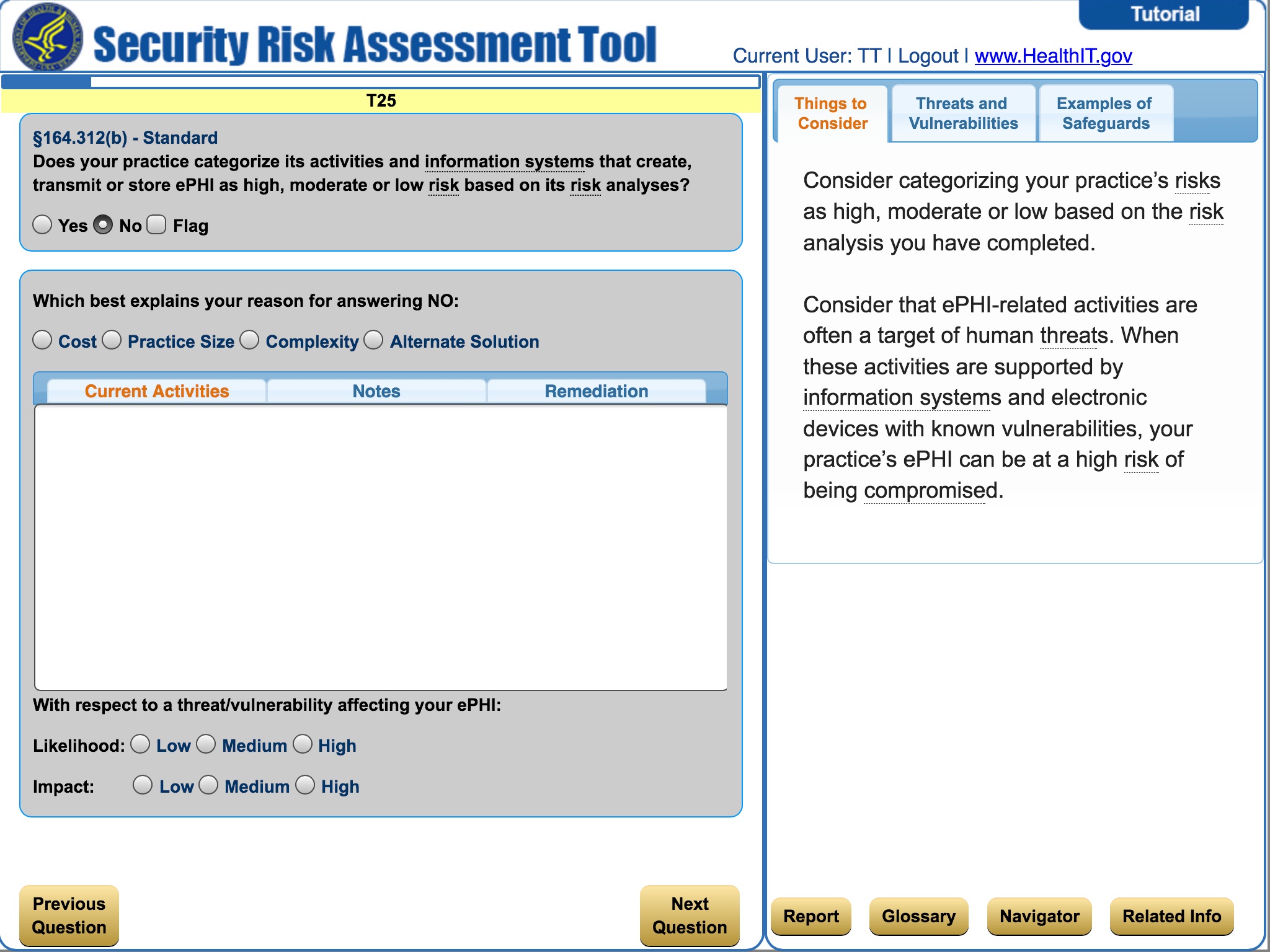
“Does your practice periodically complete an accurate and thorough risk analysis, such as upon occurrence of significant event or change in your business organization or environment?” Each question is answerable by yes, no or flag. When you click any of the options, the question expands and allows you to elaborate on the answer:

image

The expanded screen gives you three tabs that allow you to elaborate on what your current steps are to address the question; notes; and ultimately any necessary remediation to bring your policy/activities in line.

All in all, the survey is fairly standard and what you would expect from a program of this kind. That said, the real gem within this app are the three tabs located on the right hand side of the screen titled: Things to Consider; Threats and Vulnerabilities; and Examples of Safeguards. These three tabs are amazing resources. I find myself going into the app when I have a question, navigating to the appropriate code section and then digging into each of these tabs to get an answer.

The first two tabs offer a very basic interpretation of what the question is looking for and what to be aware of when answering. You can also click certain keywords and the tool with provide you with a basic definition. This is very handy if you are new to the HIPAA compliance game or your IT skills are not advanced. The last tab, Examples of Safeguards, is a gold mine of information. Not only does it provide you with different examples, but it gives you code section numbers and citations to NIST standards. This tab does a lot of the legwork you would have to do in order to figure out whether your safeguards count towards answering the question at hand. Finally, if you are a really looking to get into the nitty gritty definitions, there is a button that takes you to the browsable built in dictionary.

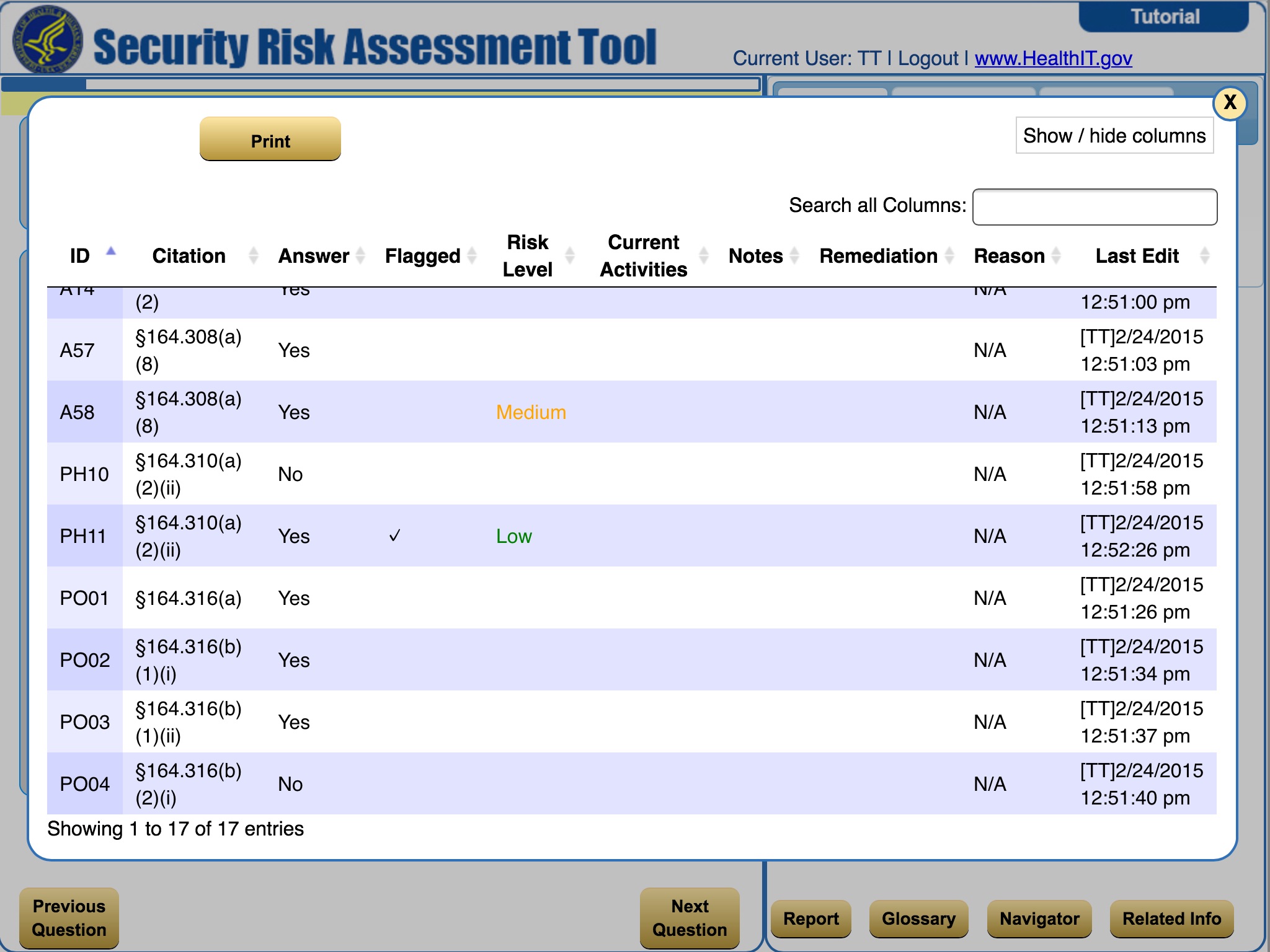
Once you have answered all of the questions (or even if you are part way through), an easy to use report is generated that organizes your responses into an easy to use format:

image

This format is exportable into an editable format (.xls) and does give you the ability to share it with others.  Unfortunately, this tool is not collaborative and there is not a way I could find to upload an excel report back into the program after it had been exported. This means that the only person who can use the application is the one with it open on their desktop/iPad.

Final Thoughts: This tool is an excellent starting place for performing your own security risk analysis. While some features are clear afterthoughts (asset inventory and business associates), the meat of this tool is dynamic, educational and a valuable tool even after you have performed your security risk analysis.  This is one of those rare times where I would like to see a new version that polishes the features and makes it collaborative. That said, this tool is a must have for any privacy, security or IT professional working in a HIPAA environment.

/s/HH @legallevity

Technology, HIPAA and You Part 2: NIST Tool

This is the second part of my series on HIPAA compliance tools, apps and hardware. This week I focus on the NIST HIPAA Toolkit.

NIST Tool

Creators: The National Institute of Standards and Technology is a part of the US Department of Commerce. NIST’s stated mission is to “promote U.S. innovation and industrial competitiveness by advancing measurement science, standards, and technology in ways that enhance economic security and improve our quality of life.”  In other words, this is government funded research aimed towards producing useable products, papers, and technology for anyone to use. NIST also co-hosted a conference in 2014 with OCR to discuss HIPAA Security rule issues.

Look and Feel: This tool is as utilitarian as you would expect from something that was funded by the US Government. It does not have splashy graphics, complex reporting or some of the features you might see in traditional for profit applications. That said, what this program lacks in pretty, it makes up for in pure unadulterated HIPAA horsepower. Once you have created a survey, the dashboard serves as a step by step walkthrough survey of the HIPAA statute beginning with 45 CFR 164.308 through 45 CFR 316.  The program works on Mac, Linux and Microsoft platforms.

Under the Hood: All told, there are 809 survey questions in the enterprise version and 492 in the standard version. The primary difference being how in depth you want to get. I used the enterprise version for an umbrella company and the standard edition for the subsidiaries/sister companies.  Each question is geared towards asking, at least in theory, exactly what a HIPAA OCR auditor would ask your company in the unfortunate event you are being audited. For example:

“Has your organization defined the frequency of your Risk Assessment policy and procedures reviews and updates? “

NIST ScreenCap

As you can see, this question is paired with a very basic response of Yes, No, or Not Applicable. In addition, you can flag the question for importance on a color/number scale and make comments. Another very impressive feature of this tool is the ability to upload the documents/policies that support your answer to the question. The feel of survey is that an auditor would use something very similar to run a company through the ringer.

Use: As you work your way through the survey, you will, almost inevitably, find glaring holes in your documentation. That is ok, if you note the misses and keep going, you can run a report that allows you to draw out questions based upon level of completeness or flag level. Ultimately, you can run a report that would, in theory, demonstrate full documentary HIPAA compliance at the click of a button for Administrative, Technical and Physical Safeguards.

A couple other neat features worth pointing out, the survey itself is saved in a .xml format that can be accessed across networks. This means different offices, such as privacy office and security office, could work on the same survey in different locations by importing the .xml file back and forth.  The .xml format also means that the technically minded could manipulate and work with that file.

The primary drawback to this tool revolves around the document attachment feature. Once a document is attached, it must be deleted and re-attached anytime changes are made. This makes using this program as a living document very problematic. The company I am with chose to keep the documents outside of the tool, but reference which policy answered the question(s).

Another negative is that this tool does not address the privacy rule aspects of HIPAA. It is solely concerned with the Administrative, Technical and Physical Safeguards. This tool can appear very daunting and complex.  That said, a methodical approach to this tool will yield good work product.

Final Thoughts: In November of 2011, NIST quietly released this tool to aid organizations in working towards HIPAA Compliance. Surprisingly, I routinely meet practioners who have never heard of this tool. Even taking into account its age (four years old) and missing pieces, it is a surprisingly robust tool that will get almost any entity organized and on the path to compliance. Add to that the versatility of being able to generate a “HIPAA Compliance Report” is amazing and being able to hand this to the auditor as a first step would certainly frame the discussion in a positive way.

Now the website clearly states the tool is for informational purposes only and does not provide the user with HIPAA compliance. However, if I had a choice between a paid third party app and an app from the agency that co-hosted the HIPAA Security Conference with the auditing entity, I would probably pick the NIST tool.  As part of a broad based HIPAA compliance strategy, the NIST tool can be very helpful in tackling the Administrative, Technical and Physical Safeguards requirements.

/s/ HH @legalevity